

Most sole traders never touch PAYE. You pay yourself through drawings, declare the profit on your Self Assessment return, and that's the end of it. Payroll only enters the picture when you take on someone who counts as an employee, or when you deliberately choose to pay yourself a salary through PAYE instead of drawings.
That's the whole decision, really. Two triggers, nothing more:
- You employ someone who is legally classed as an employee, even part time or casual.
- You choose to pay yourself via PAYE rather than taking drawings.
If either applies, your first move is simple: check the employment status of anyone you pay, and if you're taking someone on, start registering as an employer with HMRC before their first payday. Do it now rather than later. Registration has lead time built in, and payday won't wait for paperwork.
Key Takeaways
Sole trader payroll only becomes necessary when you employ staff or deliberately pay yourself through PAYE, and getting the timing of HMRC registration right matters as much as the mechanics of running it.
| Point | Details |
|---|---|
| Confirm the trigger first | Payroll applies only if you employ someone or choose PAYE for yourself, not for standard drawings. |
| Register with HMRC early | You can't register more than two months before payday, and processing can take 10 to 15 working days. |
| Submit RTI every payday | Every Full Payment Submission must be sent on or before payday, covering pay, tax, NI, and statutory payments. |
| Budget for real hiring costs | Employer's National Insurance and employer's liability insurance both add to the true cost of a hire. |
| Keep records ready with Soledigital | Soledigital tracks income, expenses, and receipts in plain English so your books stay HMRC-ready as payroll needs grow. |
Table of Contents
- Do you actually need sole trader payroll?
- Registering as an employer: what to expect and when to start
- Which route should you pick: HMRC tool, payroll software or outsourcing?
- How do you actually set up and run your first payroll?
- What ongoing compliance do you need to stay on top of?
- What if you employ family members or take a PAYE salary yourself?
- How do National Insurance contributions differ once you have staff?
- What about PAYE Settlement Agreements for expenses and benefits?
- What's the smartest way to approach sole trader payroll?
- Keep your books ready for whatever payroll throws at you
- Sources
Do you actually need sole trader payroll?
Drawings are not a salary. When you take money out of your business as a sole trader, you're simply withdrawing profit you've already been taxed on through Self Assessment. No PAYE, no payslip, no employer reference number required. This confuses a lot of new business owners who assume "paying myself" automatically means running payroll. It doesn't.
PAYE becomes compulsory in three situations:
- You hire an employee – even one person working a few hours a week can trigger PAYE obligations, depending on how much they earn and whether they have another job.
- You choose to pay yourself a PAYE salary – some sole traders do this deliberately to build up qualifying years for the State Pension, on top of drawings.
- You take on subcontractors under the Construction Industry Scheme (CIS) – different rules apply here, but the administrative burden is similar.
A useful practical cue: if you're paying someone roughly £96 a week or more (the current Lower Earnings Limit territory), you almost certainly need to check their employment status properly rather than guessing. Misclassifying an employee as self-employed is one of the most common and costly mistakes small employers make.
Pro Tip: If you're not sure whether someone counts as an employee, a casual worker, or a genuine subcontractor, ask an accountant before their first payment goes out. Getting this wrong retroactively is far more painful than a short delay upfront.
Registering as an employer: what to expect and when to start
You must register as an employer with HMRC before you pay your first member of staff, full stop. There's no grace period once you've started paying wages.
There's a catch most people miss on the other side of that deadline: you cannot register more than two months before your first expected payday. Register too early and HMRC will bounce you back. Register too late and you're non-compliant from day one.
Here's what the process actually involves:
- Set up or use an existing Government Gateway account (most sole traders will need an organisation account, not just an individual one, to register as an employer).
- Use HMRC's online "register as an employer" service to apply for your PAYE reference and Accounts Office reference.
- Wait for those references to arrive before your first RTI submission, since you'll need them to run payroll correctly.
Registration typically takes up to around two weeks on working days, though this can stretch further if HMRC needs extra verification, according to Register as an employer, GOV.UK. If you're cutting it close to a start date, don't rely on phoning HMRC to speed things up. Callers rarely shorten this timeline.
While you wait, use the time to budget properly. Employer's liability insurance is a legal requirement the moment you have staff (with very few exceptions), and it's worth pricing up alongside employer National Insurance before you commit to a hire.
Which route should you pick: HMRC tool, payroll software or outsourcing?
The right choice depends almost entirely on how many people you're paying and how much admin you want to own yourself.
- HMRC Basic PAYE Tools is free and does the job for very small, simple payrolls, typically fewer than ten employees. It calculates tax and NI and lets you submit RTI, but the interface is basic, and it won't produce polished payslips or integrate with your wider bookkeeping.
- Cloud payroll software suits most sole traders with one to five staff. These tools generate payslips automatically, handle RTI submissions, and manage auto-enrolment duties without you needing to understand the underlying calculations. Most sole traders don't need payroll software at all unless they employ staff or take a PAYE salary, so there's no rush to overspend on features you won't use.
- An accountant or payroll bureau makes sense if you'd rather hand off compliance entirely, particularly once you're juggling statutory payments, pension contributions, or more than a handful of staff.
- An integrated bookkeeping and payroll approach works best if you want your payroll costs to reconcile neatly against your Self Assessment figures without manual cross-checking every quarter.
Start simple. You can always move up a tier once your team, or your confidence, grows.
How do you actually set up and run your first payroll?
Getting your first pay run right sets the tone for everything after it. Rush this stage and you'll spend months untangling errors.
- Collect employee details before anything else. You need their National Insurance number, a P45 from their previous employer (or a completed HMRC starter checklist if they don't have one), and their correct tax code.
- Decide your pay frequency and set up a payroll ID for each employee inside your chosen software or tool, whether that's Basic PAYE Tools or a cloud app.
- Configure your settings properly. Make sure statutory payments (sick pay, maternity pay, and so on) and any regular deductions are set up correctly before you run your first calculation, not after.
- Run the pay calculation and generate payslips. Your software should calculate gross pay, Income Tax, employee National Insurance, and employer National Insurance automatically.
- Submit your Full Payment Submission (FPS) on or before payday, every single time, using RTI reporting. RTI submissions must include gross pay, tax deductions, National Insurance contributions and statutory payments for that pay period.
- Pay HMRC what you owe for PAYE tax and both employee and employer National Insurance by the relevant payment deadline, usually the 22nd of the following month if paying electronically.
- Keep records of every submission and payslip. You'll need these for year-end tasks like producing P60s, and HMRC expects them retained for inspection purposes.
Pro Tip: Set a recurring calendar reminder for your FPS deadline, not just your pay date. Missing an "on or before payday" submission by even a day can trigger a late filing notice, even if the wages themselves went out on time.
What ongoing compliance do you need to stay on top of?
Running payroll isn't a one-off task. It repeats every pay period, and the obligations don't ease off after your first successful run.
- Every payday, your RTI submission must report gross pay, Income Tax, National Insurance, and any statutory payments accurately, since payroll software usually automates these calculations but the employer remains responsible for their accuracy.
- Every employee needs a payslip for each payment, even for one-off or irregular payments.
- Budget properly for employer's National Insurance. This is a cost your business absorbs directly. It doesn't come out of the employee's pay, which is a detail that catches new employers off guard when they're pricing up a hire.
- Check whether auto-enrolment pension duties apply once an employee meets the age and earnings criteria.
- Keep payroll records for at least three years, covering payslips, RTI submissions, and correspondence with HMRC, in line with recordkeeping expectations set out by the Low Incomes Tax Reform Group.
Late payments and inaccurate or late RTI submissions can both trigger penalties and interest charges from HMRC, and repeated failures escalate the risk of a formal compliance check.
What if you employ family members or take a PAYE salary yourself?
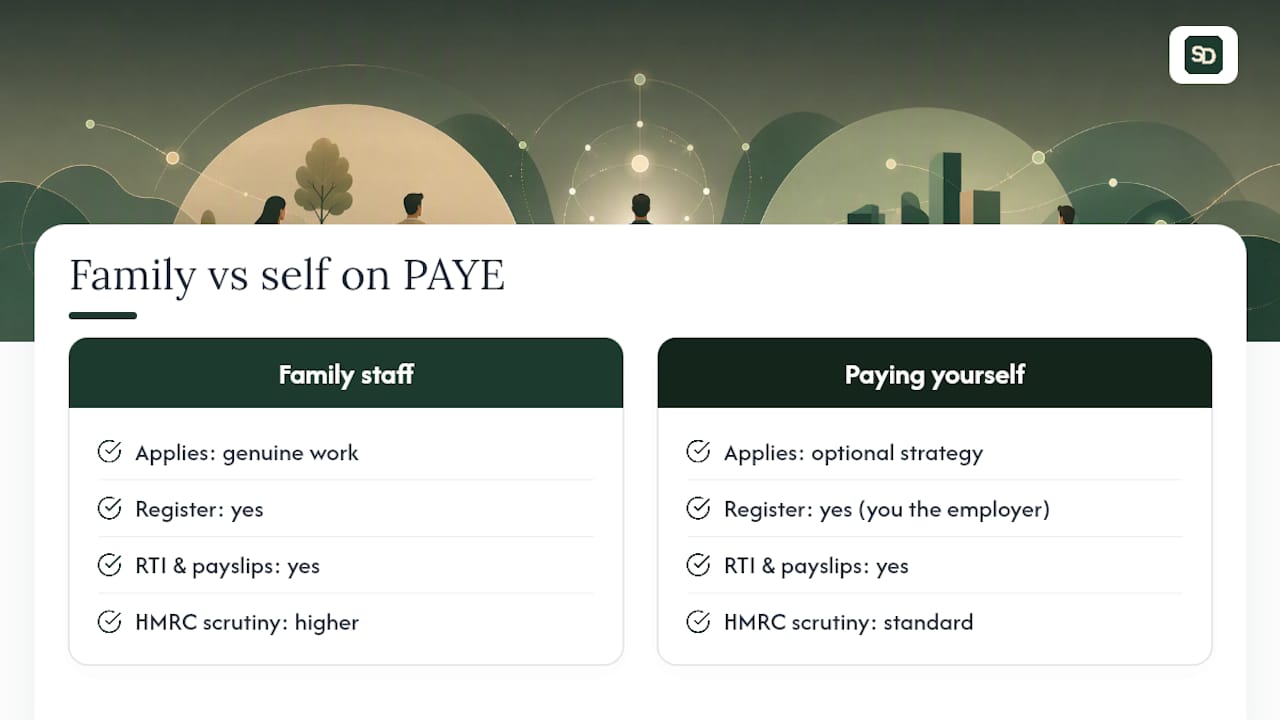
Employing your spouse, partner, or a family member doesn't exempt you from any of the standard rules. If they're doing genuine work for the business and receiving pay for it, they're an employee like anyone else, and PAYE applies exactly the same way, including registration, RTI submissions, and payslips. HMRC does scrutinise family arrangements more closely, particularly where pay looks disproportionate to the work done, so keep clear records of hours worked and duties performed.
There's a separate scenario worth understanding: putting yourself on PAYE. As a sole trader, you're not legally an employee of your own business, so you're never required to run payroll for yourself in the way a limited company director might be. However, some sole traders choose to pay themselves a small PAYE salary alongside their drawings, usually to build qualifying years towards their State Pension without relying solely on Class 2 or Class 3 National Insurance contributions.
If you go this route, you become an employer for payroll purposes even though the "employee" is you. That means registering with HMRC, running RTI submissions for your own salary, and keeping the same records you'd keep for any other member of staff. It's an optional strategy, not a requirement, and it adds a layer of admin that many sole traders decide isn't worth it unless their pension planning specifically calls for it.
How do National Insurance contributions differ once you have staff?
As a sole trader with no employees, your National Insurance situation is straightforward: you pay Class 2 and Class 4 contributions through your Self Assessment return, calculated on your profits. There's no payroll involved and no separate employer contribution to think about.
The moment you take on an employee, a second, entirely different NI system kicks in. You're now responsible for deducting employee National Insurance from their pay and, separately, paying employer's National Insurance on top of their wages. Employer NI applies to earnings above the secondary threshold and is calculated automatically by most payroll software, but the crucial point is that it's an additional cost to your business, not a deduction from the employee's net pay.
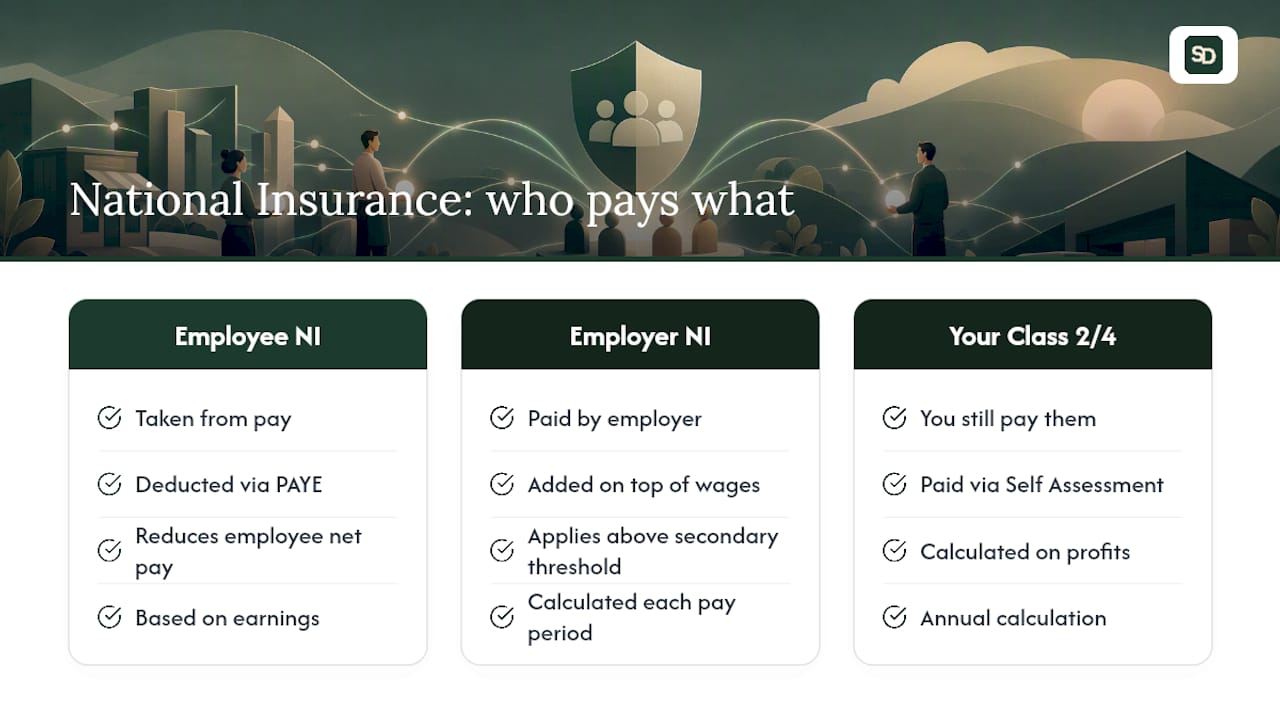
This is where a lot of new employers underestimate their true hiring cost. If you offer someone a wage, the actual cost to you is that wage plus employer NI plus any pension contributions once auto-enrolment applies. A £25,000 salary is never just £25,000 out of your business.
Your own Class 2 and Class 4 contributions carry on exactly as before, unaffected by whether you employ anyone. The two systems run in parallel: one calculated annually through Self Assessment for you, and one calculated every pay period through PAYE for your staff. Keeping them mentally separate helps avoid confusion when you're reconciling your books at year end, particularly if you're using the same software to track both.
What about PAYE Settlement Agreements for expenses and benefits?
If you reimburse employees for certain expenses or give them minor benefits, such as occasional gifts, small incidental costs, or shared items like a staff meal, you may need a PAYE Settlement Agreement (PSA) with HMRC rather than reporting everything individually through payroll or P11Ds.
A PSA lets you settle the tax and National Insurance on specific minor, irregular, or impracticable benefits in one annual payment, rather than adding them to each employee's payslip or year-end reporting. It's particularly useful for small, one-off items that aren't worth the admin of individual reporting.
To stay compliant, you need to:
- Apply to HMRC for a PSA before the tax year starts, or as early as possible, since agreements typically need to be in place ahead of the benefits being provided.
- Identify which expenses or benefits genuinely qualify. Regular, contractual benefits usually don't; occasional, minor, or shared benefits usually do.
- Calculate the tax and Class 1B National Insurance due on the grossed-up value of those benefits.
- Pay the amount owed by the deadline following the tax year end, which HMRC confirms as part of the agreement.
- Keep records showing what was included, why it qualified, and how the calculation was reached, in case of a later review.
Skipping this step and simply not reporting minor benefits at all is a common mistake among new employers, and one that surfaces quickly in an HMRC compliance check.
What's the smartest way to approach sole trader payroll?
Most guidance on this topic buries the real answer under too much procedural detail. Here's the part that actually matters: the decision to start payroll is binary and rare. You either employ someone, or you don't. You either choose PAYE for yourself, or you take drawings. There's no murky middle ground, no "sort of need it" scenario, despite how the paperwork makes it feel.
Where conventional advice falls short is timing. Most articles tell you how to register but underplay when. Two months maximum before your first payday, ten to fifteen working days of processing, and a strict rule against registering too early creates a narrow window that catches people out constantly. If you're planning to hire, start the clock the moment you have a start date, not the week before.
Prioritise this order: confirm employment status properly, register with HMRC immediately once you know you're hiring, then pick the simplest tool that covers your actual headcount. Don't overbuy software for one employee, and don't underestimate what employer NI adds to your real hiring cost.
— Bobby
Keep your books ready for whatever payroll throws at you
Running payroll well isn't just about hitting HMRC deadlines. It's about your books actually reflecting what's happening in your business, so tax time doesn't turn into detective work. Soledigital was built for sole traders who want their bookkeeping to keep pace with real life, whether that's job income coming in, expenses going out, or a first hire changing the shape of your finances.
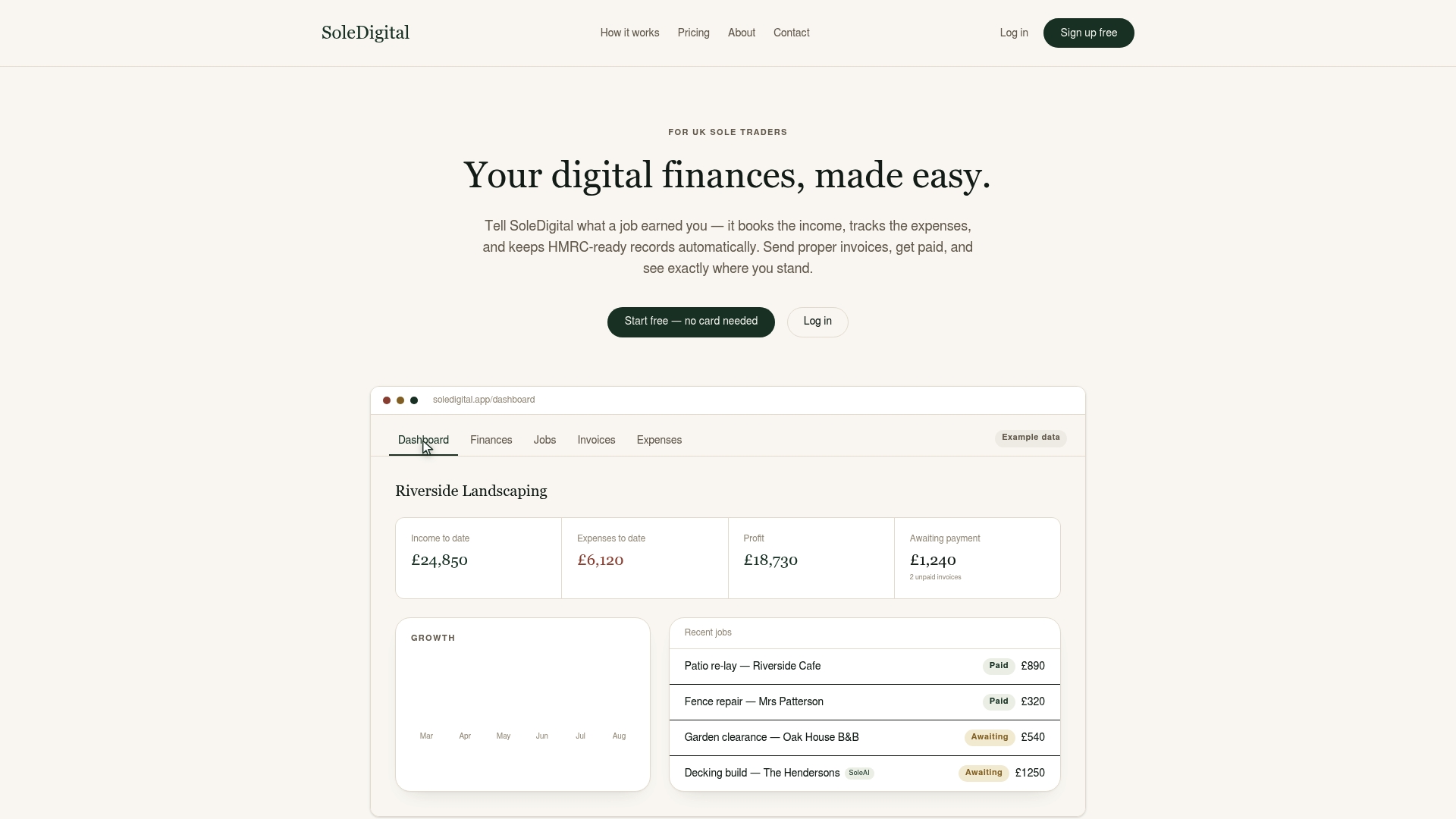
You can log income and expenses in plain English, snap a photo of a receipt and let SoleAI sort the detail, and generate invoices without wrestling with spreadsheets. SoleAI also answers your HMRC questions directly, which matters enormously once you're juggling employer registration deadlines alongside your usual bookkeeping. As your business grows into payroll territory, having clean, HMRC-ready records already in place means less scrambling and fewer late nights reconciling numbers that don't add up.
Head to Soledigital to see how it fits your business, or check the pricing plans to find the right level for where you are right now.
Sources
- Gov
- Paye and National Insurance - Tax Confident campaign
- Registering as an employer | Low Incomes Tax Reform Group